Right-click, sign, done.
Your document gets a cryptographic companion — and the original file is never modified. This is what actually happens when you seal a document.
Signing a document with TrustDID creates a .vrfy sidecar—a small companion file that proves who signed it, when, and that the document hasn’t been tampered with. The original file is never modified.
Three Steps to Sign
-
Choose your document
Any file on your computer—PDF, Word, Excel, HTML, images, CAD drawings, source code. TrustDID works with every file type because it uses the document’s SHA-256 hash, not its contents.
-
Right-click and sign
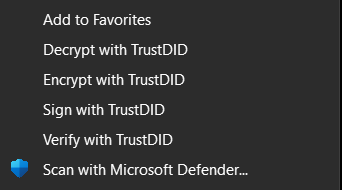
Right-click the file in Windows Explorer and select Sign with TrustDID. The signing engine runs locally on your computer. Your private key never leaves your machine. The process takes less than a second.
-
Send both files
You now have two files: the original document and its
.vrfysidecar. Send them together—by email, file share, USB drive, or any channel. The recipient verifies with a single click.invoice.pdf + invoice.pdf.vrfy
What Happens Under the Hood
When you click “Sign,” four things happen in milliseconds—all on your computer, nothing leaves your machine.
1. Hash the document
SHA-256 computes a unique fingerprint of your file. If even one byte changes later, the hash won’t match.
2. Sign with Ed25519
Your private key creates an Ed25519 signature over the document hash. This is the primary proof of authorship.
3. Sign the manifest
A second Ed25519 signature protects the .vrfy file itself. This prevents attackers from tampering with the sidecar.
4. Add quantum proof
An ML-DSA-44 post-quantum signature is added automatically. Your documents are quantum-safe from day one.
Works with Every File Type
TrustDID is file-type agnostic. It signs the hash of the file, not its contents—so any digital format works. The original document stays byte-for-byte identical.
Before and After
Without TrustDID
Send invoice.pdf by email
Recipient calls: “Did you send this?”
Manual verification, phone tag, delays
No proof of origin or integrity
With TrustDID
Send invoice.pdf + invoice.pdf.vrfy
Recipient right-clicks to verify
Instant cryptographic confirmation
Tamper-evident, quantum-safe, private
What Stays Private
- Your private key never leaves your computer
- Your document is never uploaded anywhere
- Signing is offline-capable—no internet required to sign
- Only the public key is published in your DID (that’s the point—it’s public)
Every Way to Sign
Right-click is just the beginning. TrustDID fits into your existing workflow—whether you’re sending one email or deploying an entire website.
Right-Click
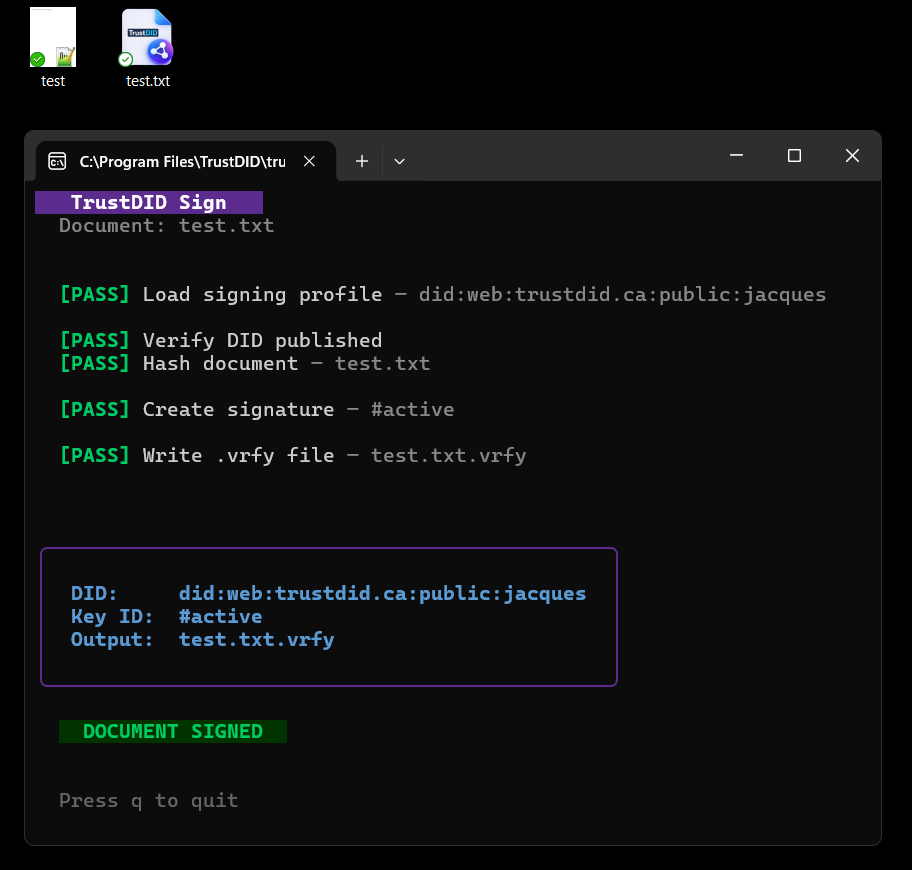
Single file, instant. Right-click any file in Windows Explorer, select Sign with TrustDID, and the .vrfy sidecar appears next to your document.
A progress window shows the result. Takes less than a second.
Email Plugin
Outlook and Thunderbird plugins sign your emails automatically. When you hit send, the plugin reads your sender address, looks up the matching DID profile, and signs every attachment. Zero clicks, zero friction.
Command Line
For developers and automation. Sign a single file with optional metadata:
trustdid_sign contract.pdf --reason "Legal review" --profile finance
Batch Directory
Sign an entire directory recursively. Perfect for website deployments, document archives, and compliance packages:
trustdid_sign_dir /var/www/html --recursive --profile server
Automatically skips .vrfy, .pem, .git, and other non-content files.
Multiple Profiles & Email Mapping
One person, many identities. Your config.json maps each email
address to a signing profile—each with its own
DID and keys.
The email plugins use this mapping to sign automatically with the right identity.
| Email address | Profile | DID |
|---|---|---|
support@trustdid.ca | support | did:web:trustdid.ca#support |
legal@trustdid.ca | legal | did:web:trustdid.ca#legal |
ceo@trustdid.ca | executive | did:web:trustdid.ca#ceo |
Ten emails, ten DIDs, all automatic. The right identity is selected based on which address you’re sending from.
Safety Net: DID Consistency Check
Before signing, TrustDID performs a safety check: it fetches your published DID document from the web and confirms that the key on your computer matches the key the world can see.
- Key mismatch? Signing is refused—recipients wouldn’t be able to verify
- Server unreachable? You get a warning, but can still sign (offline-capable)
- Pre-publication? Use
--localto skip the check while setting up your DID for the first time
This prevents the most common mistake: signing with a key that doesn’t match what’s published, which would cause every verification to fail.