It fits where you
already work.
No new portal to log into, no workflow to relearn. TrustDID shows up as a right-click, an add-in, and an extension — in the tools your team opens every morning.
Windows
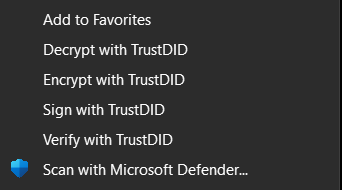
Seal, check, encrypt and decrypt straight from File Explorer — one right-click on any file. A signed installer sets up everything, including a local service that keeps the add-ins fast.
Email — Outlook, Gmail, Thunderbird
Invoices arrive by email — so that's where checking belongs. The add-ins verify messages and their attachments right in your inbox, and seal what you send out.
Browser — Chrome, Edge, Firefox
Documents you download check themselves as they land, and any sealed page or file on the web is one click from a verdict.
Command line & API
For your IT team: the full toolkit as clean command-line tools — sign whole folders, automate sealing in your pipelines, run diagnostics — plus a public verification API.
Everything runs on your machines
Sealing, checking and encrypting all happen locally. Your documents are never uploaded anywhere — not to us, not to anyone. The only things that travel are public facts: identities and vouch lists.